
Starting from version 11.0 , we have introduced a new, more intuitive workflow for generating all Featured Reports and Charts within ActivityTimeline.
Key Changes
1. Unified and Simplified Report Creation Flow
-
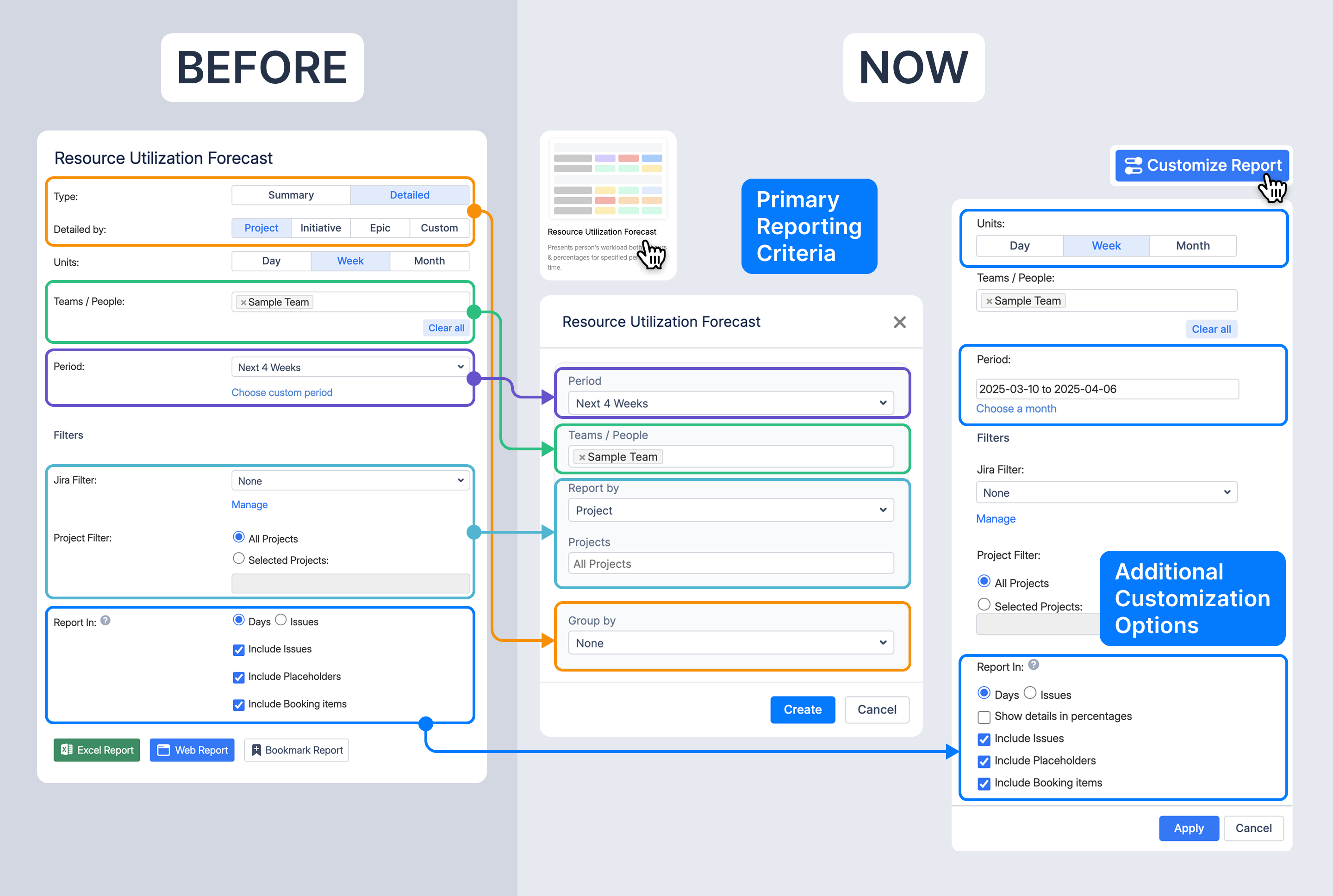
Previously, report criteria were displayed in extensive forms, making the setup process cumbersome (Before).
-
Now, a streamlined modal (Now) allows users to define primary reporting criteria in a structured, step-by-step manner before generating the report.
2. New Report Generation Page – What’s Included?
The first report generation page now presents the most essential settings in a structured way:
-
Period Selection: Users can choose from predefined options (e.g., Next 4 Weeks). Once the report is generated, they can fine-tune the date range to a custom period if needed.
-
Teams / People: A team or individual can be selected before generating the report, with the option to adjust this later in the customization panel.
-
Report by: This acts as a filter to determine what data should be used for the report. Users can choose, for example:
-
By Project: Select a specific project or leave it as All Projects to see broader data.
-
By Jira Filter: Choose a specific Jira filter to define the dataset.
-
-
Group by: This replaces the previous Summary/Detailed report selection.
-
None = Summary report (aggregated view)
-
Selecting an option (e.g., Project, Initiative, Epic) makes the report detailed based on that grouping.
-
3. Additional Customization Options After Report Generation
-
All advanced settings that were previously configured upfront are now accessible from

-
Users can dynamically adjust settings such as:
-
Jira filters
-
Project filters
-
Reporting options (Showing details in percentages, including placeholders, booking items, etc.)
-
Units (Day/ Week/ Month)
-
Custom reporting period.
-
-
Bookmarking and exporting to Excel now is done directly from the report page using the button located in the top-right corner of the screen.

Benefits of the New Report Generation Workflow
✅ More intuitive workflow – Clear separation between report creation and customization.
✅ Consistent user experience – A standardized approach across all main reports.
✅ Greater control over reporting data – Enhanced filtering and customization options.
✅ More flexibility – Users can modify settings dynamically within the report view.