
As an ActivityTimeline administrator, you can configure whether worklogs should be synchronized from Jira to ActivityTimeline, or whether this synchronization should be disabled.
When worklog synchronization is enabled, ActivityTimeline automatically synchronizes worklog updates from Jira every 10 minutes by default.
If you need the latest changes to appear sooner, you can manually refresh the data by clicking the

When to run worklog synchronization manually
Worklog synchronization is especially important when Jira or another connected app is used as the main time tracking provider. You can synchronize worklogs either partially or fully.
To do this, go to:
Configuration → Synchronization → Refresh Worklogs
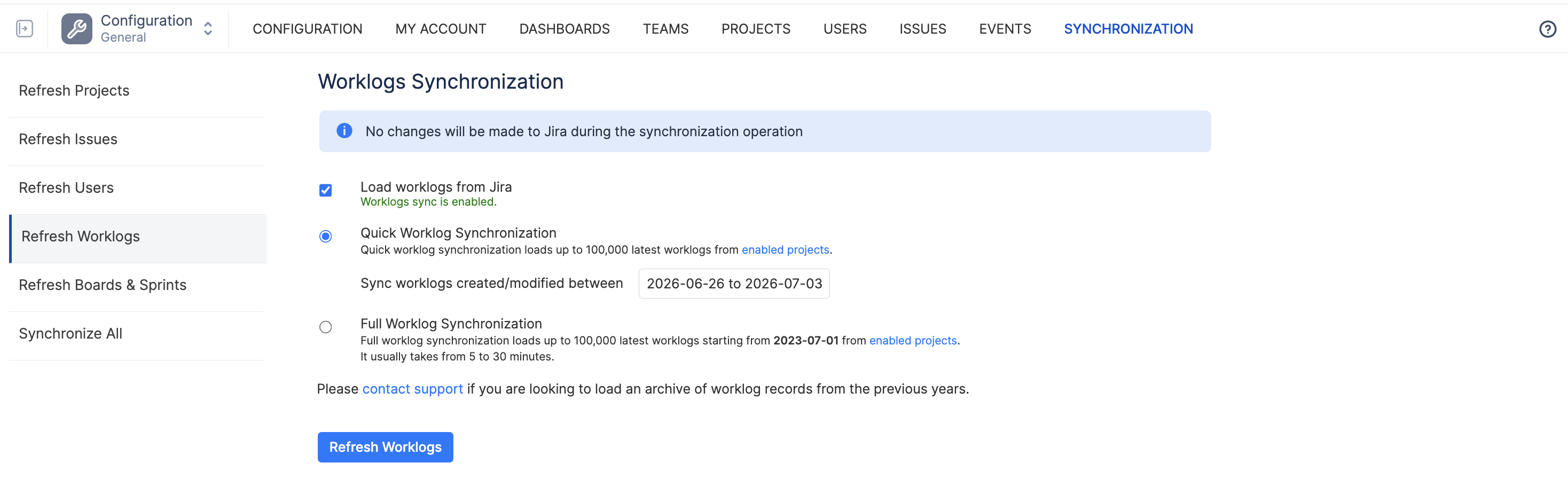
Then select the action you would like to perform.
If ActivityTimeline is used as the time tracking provider and users log time directly in ActivityTimeline, worklogs appear immediately and do not require Jira-to-ActivityTimeline synchronization.
Partial Worklog Synchronization
Use Partial Worklog Synchronization when you need to quickly update recent worklog changes from Jira.
This option is recommended for most day-to-day cases, for example:
-
recently added worklogs are not visible in ActivityTimeline;
-
recently edited worklogs are not updated;
-
worklog totals look slightly different between Jira and ActivityTimeline;
-
you need to refresh the latest Jira time-tracking data without running a larger synchronization.
Partial synchronization is faster and is usually enough when the discrepancy is related to recent changes.
Full Worklog Synchronization
Use Full Worklog Synchronization when you need to reload a larger set of worklog data from Jira.
This option may be useful when:
-
worklog synchronization was disabled for some time and then enabled again;
-
a large number of historical worklogs were updated in Jira;
-
Jira was changed or reconfigured as the time tracking source;
-
project synchronization settings were changed;
-
you need to make sure ActivityTimeline has the latest available worklog data from Jira across enabled projects.
By default, Full Worklog Synchronization processes up to 30,000 of the latest Jira worklogs from enabled projects. If your instance contains more worklogs, you can increase this limit in Advanced Settings by modifying the Number of worklogs to load from Jira setting.
Worklog synchronization only updates data in ActivityTimeline. It does not change, edit, or delete worklog data in Jira.
Worklogs from inactive projects will not be synchronized.
Click on enabled projects link or go to Projects → Project list to change the project statuses.