
ActivityTimeline uses periodic incremental synchronization to load new Jira issues and detect deleted Jira issues or worklogs.
In most cases, regular synchronization is enough. However, when many updates happen in Jira within a short period of time, some deleted issues or worklogs may not be removed from ActivityTimeline immediately.
To make deletion synchronization more reliable, we recommend configuring additional Jira webhooks.
Webhooks allow ActivityTimeline to detect deleted Jira issues and worklogs more promptly and remove them from ActivityTimeline without waiting for the next synchronization cycle.
Why We Recommend Webhooks
Webhooks help keep ActivityTimeline data consistent with Jira.
They are especially useful for:
-
Removing deleted Jira issues from ActivityTimeline.
-
Removing deleted Jira worklogs from ActivityTimeline.
-
Keeping ActivityTimeline synchronized with Jira more reliably.
Configuring Webhooks
To configure webhooks, go to:
Configuration → Jira Integration → Webhooks Config
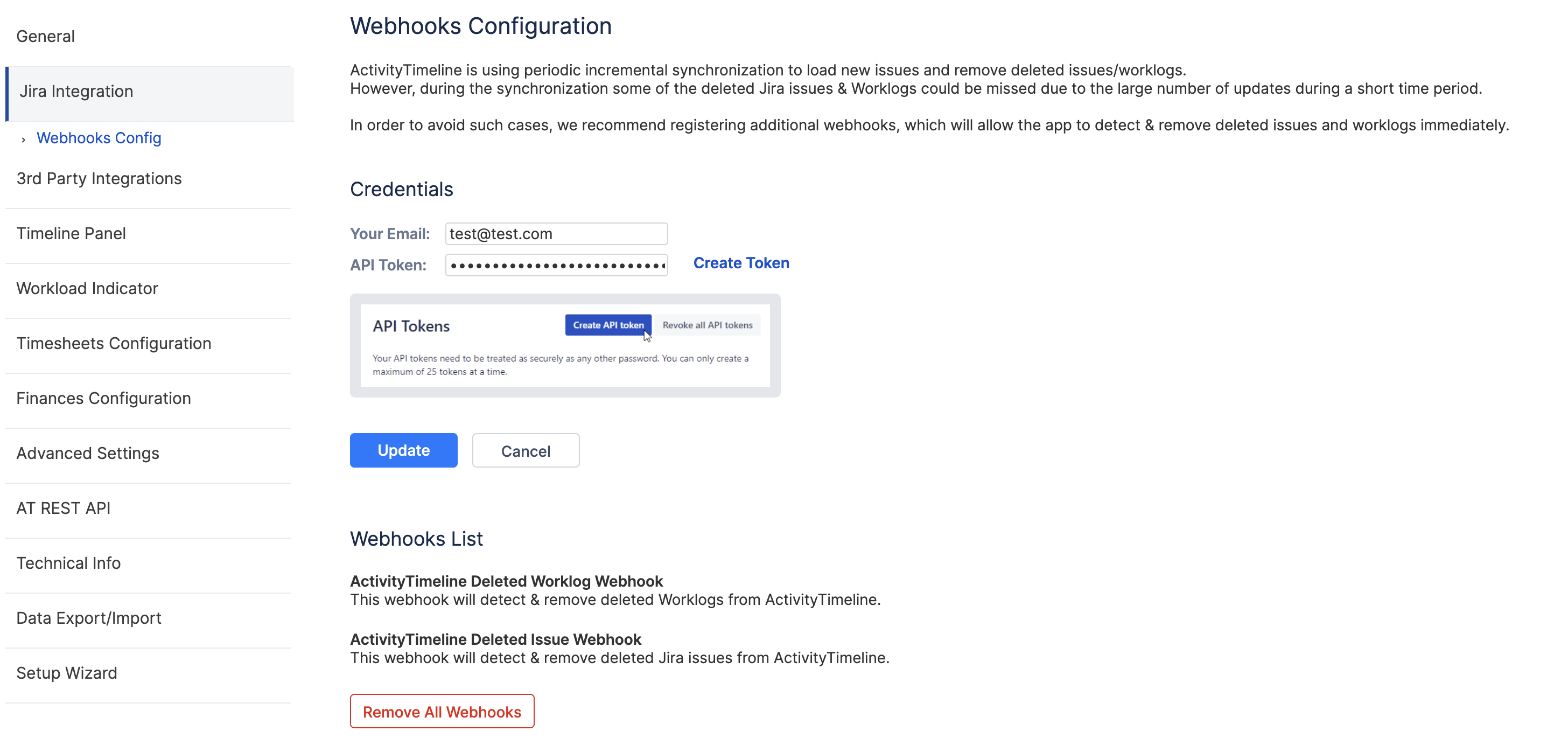
On this page, enter your:
-
Email
-
Atlassian API Token
You can create a new API token by clicking the Create Token link.
After entering the credentials, click Update.
Then click Add Webhooks.
ActivityTimeline will create two webhooks:
-
ActivityTimeline Deleted Worklog Webhook
Detects and removes deleted Jira worklogs from ActivityTimeline. -
ActivityTimeline Deleted Issue Webhook
Detects and removes deleted Jira issues from ActivityTimeline.
Once the webhooks are created, Jira issues and worklogs deleted in Jira will also be removed from ActivityTimeline automatically.
If you encounter the error ‘Cannot create webhook: status code: 403, reason phrase: Forbidden’ and you are on Jira Premium using the IP allowlisting (whitelisting) feature, this means that Jira is blocking the connection. To resolve this, you need to add ActivityTimeline’s IP addresses to your Jira whitelist.
For security reasons, the list of IP addresses depends on your specific instance. Please contact our support team at support@reliex.com, and we’ll provide you with the correct IP addresses to configure.
Required Permissions
The user whose email and API token are used should have sufficient Jira permissions to create webhooks. If the credentials do not have the required permissions, webhook creation may fail.
Removing Webhooks
If needed, administrators can remove the configured webhooks by clicking Remove All Webhooks on the Webhooks Configuration page.
Use this option only if you no longer want ActivityTimeline to receive deletion updates through Jira webhooks.
Recommended Usage
We recommend keeping webhooks enabled as a permanent synchronization improvement.
The Maintenance page can still be used as a manual fallback if a deleted issue or worklog needs to be removed from ActivityTimeline manually. However, webhooks are the preferred way to keep deleted Jira data synchronized automatically.