
This page is applicable to the Cloud version of ActivityTimeline.
ActivityTimeline Cloud is available in two editions: Standard and Advanced.
The Standard Edition includes all core planning, resource management, time tracking, and reporting capabilities required by most teams in Planner, Workspace, Timesheets, and Reports.
The Advanced Edition includes everything in Standard, plus additional capabilities designed for organizations that need deeper financial visibility, advanced analytics, and enhanced support.
Advanced features such as Finances, Alignment reporting, and Premium Support help larger teams and enterprises gain greater operational insight, improve planning accuracy, and receive faster expert assistance when needed.
Existing Standard Edition customers can upgrade to Advanced at any time to unlock these additional capabilities.
|
|
Standard Edition |
Advanced Edition |
|---|---|---|
|
Planner Capacity planning, resource allocation, workload indication, project scheduling, and team availability management in a single visual timeline. |
|
|
|
Workspace Personal view for task management, time tracking, work logging, progress monitoring, and utilization insights in one place. |
|
|
|
Timesheets Timesheets, time tracking, worklog approvals, utilization monitoring, and reporting for complete visibility into team performance and logged work. |
|
|
|
Reports Analytics, dashboards, custom reports, utilization metrics, and performance insights for data-driven project and resource management. |
|
|
|
Finances Project costing, budget management, profitability analysis, labor cost tracking, and financial insights for informed business decisions. |
|
|
|
Alignment Compare planned time versus logged time by user, project, issue, or a custom field. |
|
|
|
Premium Support Get expert guidance for critical issues and complex setup questions. |
|
|
Advanced Edition is recommended for organizations that require project profitability analysis, budget management, plan-versus-actual reporting, and an expert support with complex setup questions.
Ready to see Advanced Edition in action?
Start an Advanced Edition trial to explore Finances, the Alignment Report and Premium Support benefits with your team.
See how to upgrade here: How to upgrade to Advanced Edition of ActivityTimeline
Should you have any questions regarding any of the new features
- feel free to contact our Support Team.
Finances Advanced Edition
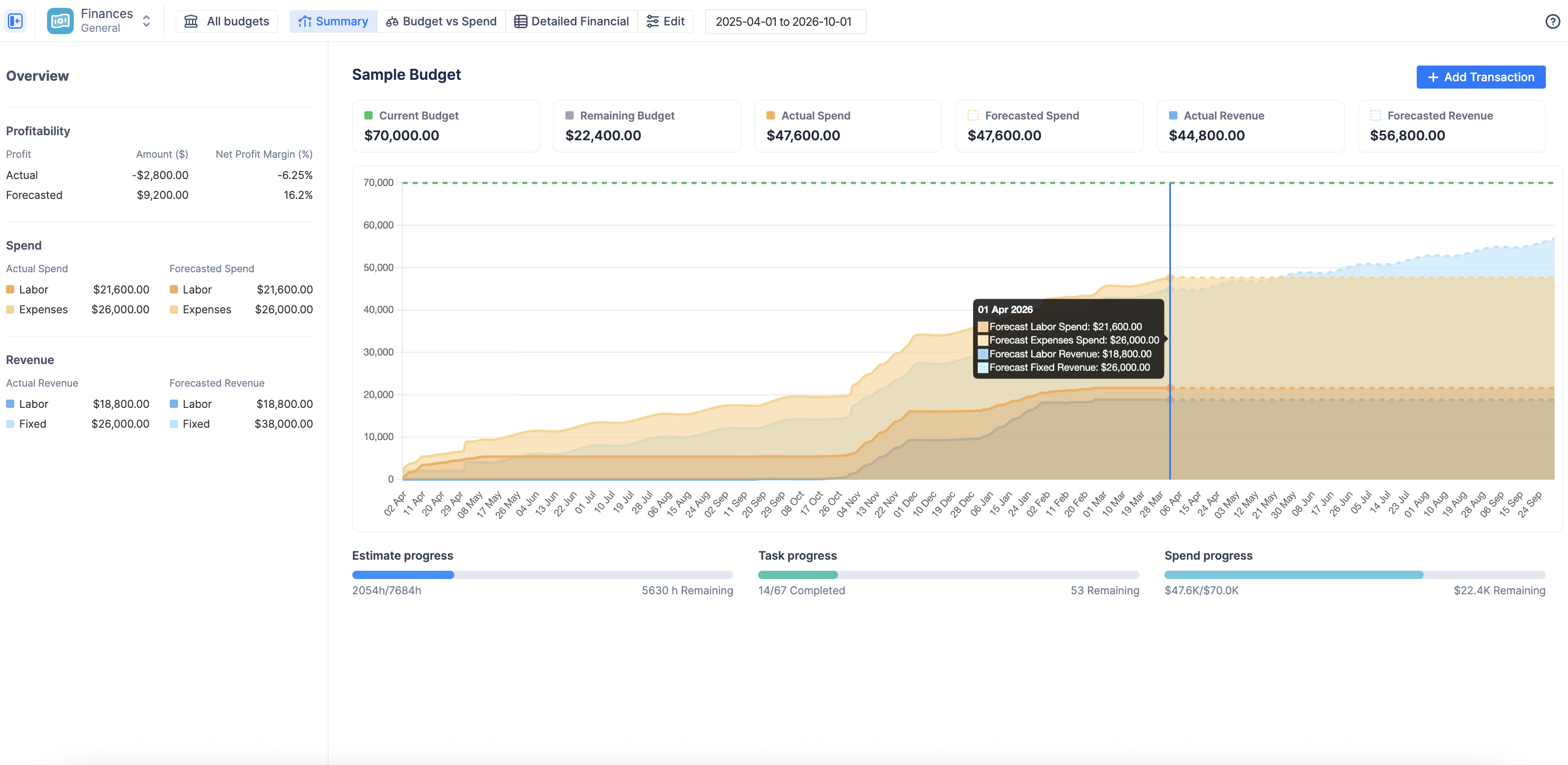
Track project cost, revenue, budgets, and profitability
The Finances module adds a financial layer to ActivityTimeline. It allows organizations to track, analyze, and control project costs and revenue directly in Jira.
Instead of managing project financials separately in spreadsheets, teams can connect Jira worklogs, task estimates, labor rates, budget allocations, and manual financial transactions into one financial view.
Finances helps teams answer questions such as:
|
Question |
Example |
|---|---|
|
How much does this project actually cost? |
Calculate labor cost from worklogs and user rates |
|
Are we staying within budget? |
Compare planned budget with actual spend |
|
Are we profitable? |
Compare cost, revenue, and margin |
|
Where is the money going? |
Break down spend by project, category, user, team, or other dimensions |
|
Can we invoice or audit the details? |
Export detailed financial data line by line |
The Finances documentation describes the module as a way to track project costs and revenue directly in Jira, including budget consumption, profitability, labor costs, fixed expenses, and planned budget versus actual spend.
How Finances works
Finances connects Jira data with financial logic.
It uses:
|
Input |
Purpose |
|---|---|
|
Jira worklogs |
Calculate labor cost and billable revenue |
|
Jira estimates and issue scope |
Define what work belongs to a budget |
|
Labor rates |
Convert logged time into cost and revenue |
|
Budget allocations |
Compare planned financial targets with actual spend |
|
Manual transactions |
Add expenses or revenue that do not come from Jira worklogs |
|
Financial reports |
Analyze spend, revenue, margin, budget usage, and forecasted outcomes |
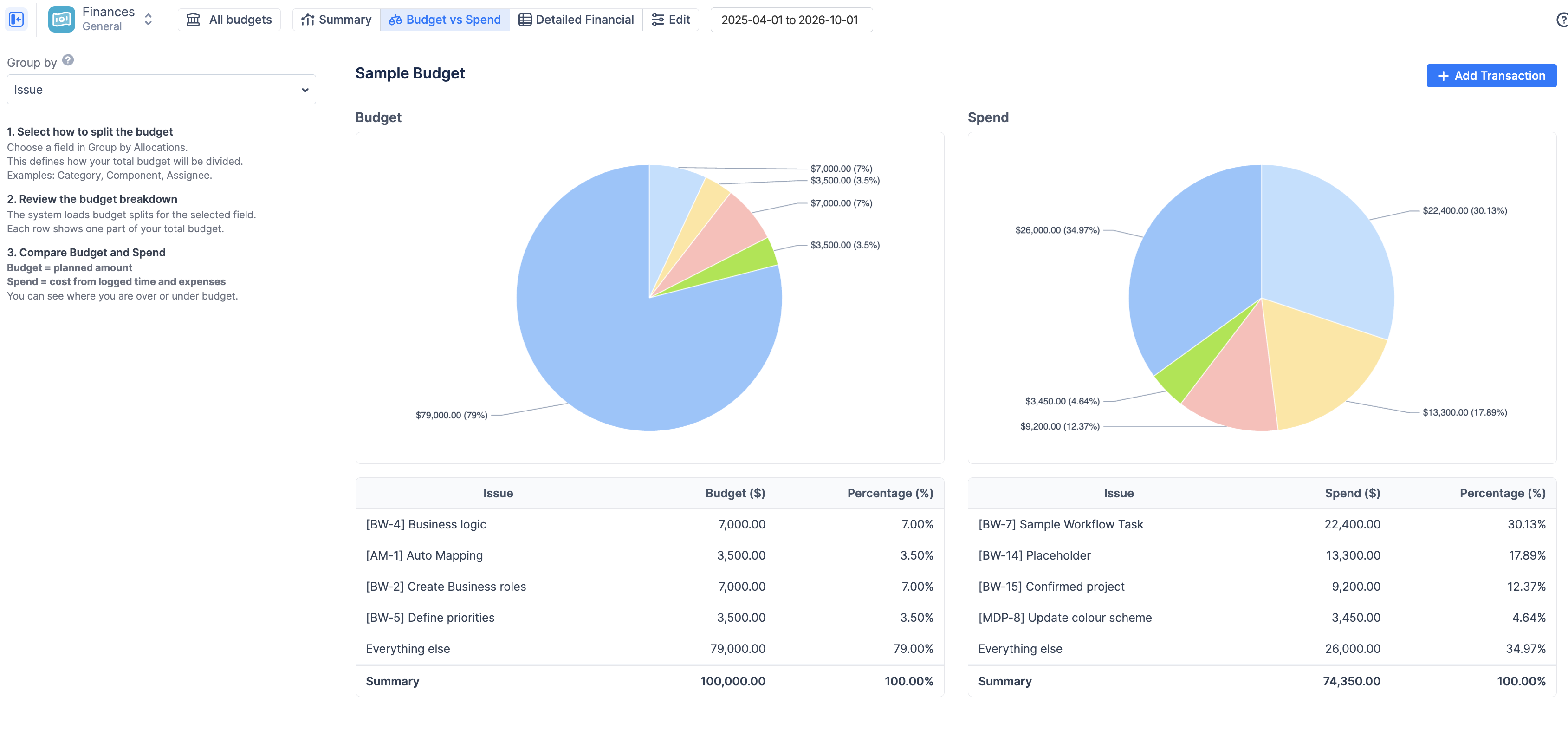
In practice, administrators or budget owners define what work should be tracked, how money should be calculated, and what financial targets the team should compare against. After that, ActivityTimeline automatically builds the financial picture from Jira worklogs, estimates, rates, budgets, and transactions.
Why Finances matters
Finances is valuable because it connects operational work with business impact.
It helps teams:
-
avoid budget overruns
-
understand real project cost
-
monitor profitability and margins
-
compare planned budget with actual spend
-
identify expensive or unprofitable work
-
support fixed-price, time-and-materials, internal, and product-company scenarios
-
reduce spreadsheet-based financial tracking
-
create a clearer connection between Jira activity and business outcomes
Best-fit teams
Finance is especially useful for:
|
Team type |
Value |
|---|---|
|
Track billable margin and client profitability |
|
|
Monitor whether delivery cost is eating into profit |
|
|
Control cost against an approved internal budget |
|
|
Compare development cost with product revenue |
|
|
Connect delivery progress with budget and financial outcomes |
|
|
Combine Jira activity with budget, cost, and revenue reporting |
Want to connect Jira work with financial outcomes?
Try Advanced Edition to track budget consumption, project cost, revenue, and profitability directly in ActivityTimeline.
Alignment Report Advanced Edition
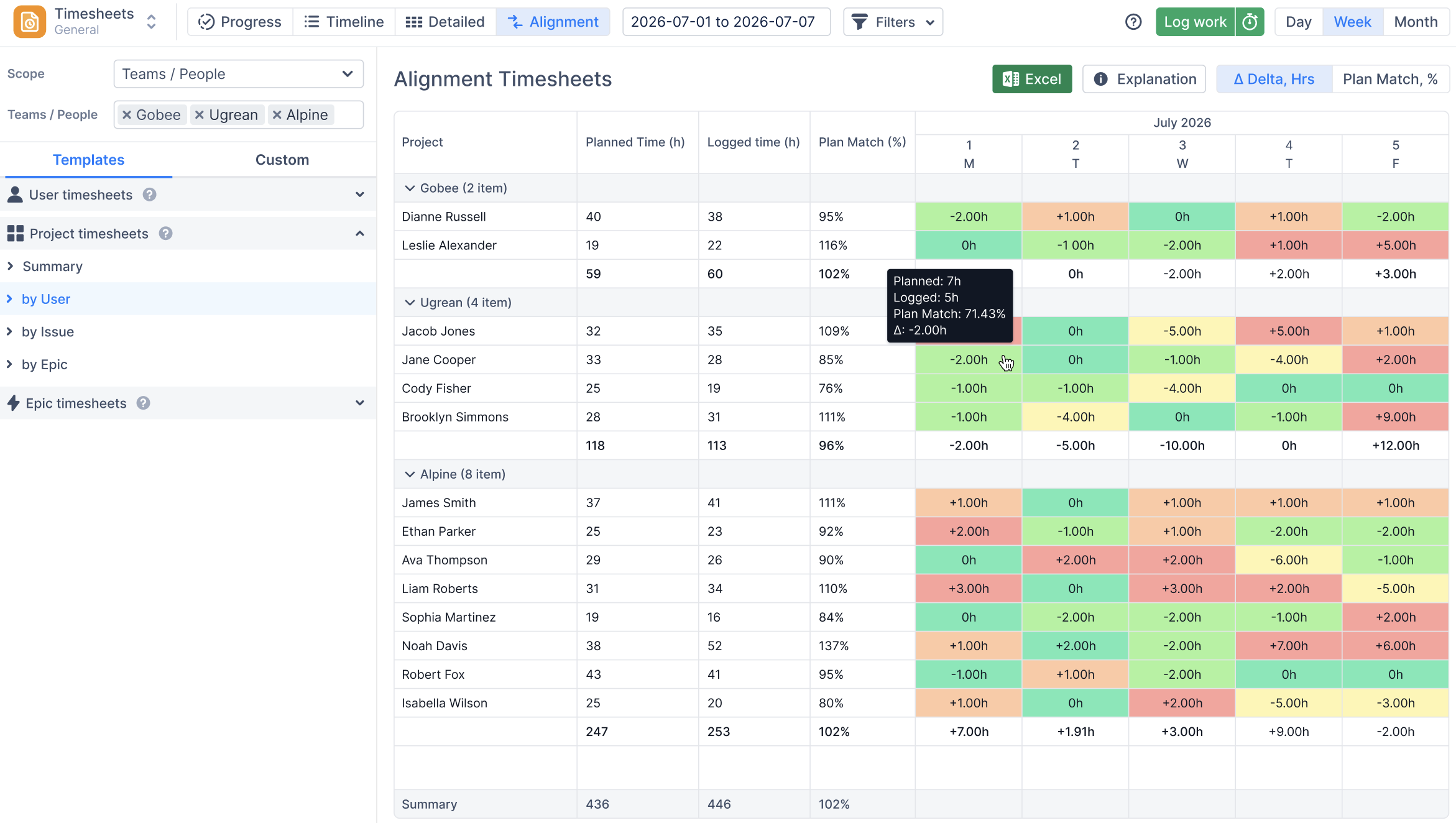
Compare planned work with actual logged time
The Alignment Report helps managers understand how closely real execution matches the plan.
It compares planned time with logged time across a selected period and allows teams to analyze the difference by user, project, issue, epic, story, or custom field.
This report is useful for answering questions such as:
|
Question |
Example |
|---|---|
|
Did users log time according to the plan? |
Compare planned hours and logged hours per user |
|
Which project consumed more time than expected? |
Group by project and compare plan vs actual |
|
Which issues were underestimated? |
Group by issue or story |
|
Which team is drifting from the original plan? |
Compare planned and logged time by team or custom field |
|
Where do we have reporting gaps? |
Find planned work with little or no logged time |
|
Where do we have unexpected work? |
Find logged time that was not originally planned |
ActivityTimeline already has a Planned vs Actual concept in timesheet reporting, comparing planned hours with logged hours to understand whether users meet the estimates set for them.
The Advanced Alignment Report expands this idea into a more flexible and detailed report for deeper analysis.
How the Alignment Report works
The report compares two core values:
|
Value |
Meaning |
|---|---|
|
Planned time |
The time that was scheduled or expected based on planning data |
|
Logged time |
The actual time reported by users through worklogs |
This report helps you understand how accurately the work was executed against the plan by showing:
-
How much time was planned
-
How much time was actually logged
-
the difference (Δ Delta, Hours)
-
the ratio between them (Plan Match, %)
Why the Alignment Report matters
The report is valuable because teams often plan in one place and log time later, but managers do not always have an easy way to compare the two.
The Alignment Report helps teams:
-
improve estimation quality
-
identify under-reported work
-
find unexpected work that was not planned
-
detect projects or issues consuming more time than expected
-
understand whether teams are following the plan
-
compare planned capacity with actual delivery
-
support more accurate forecasting in future planning cycles
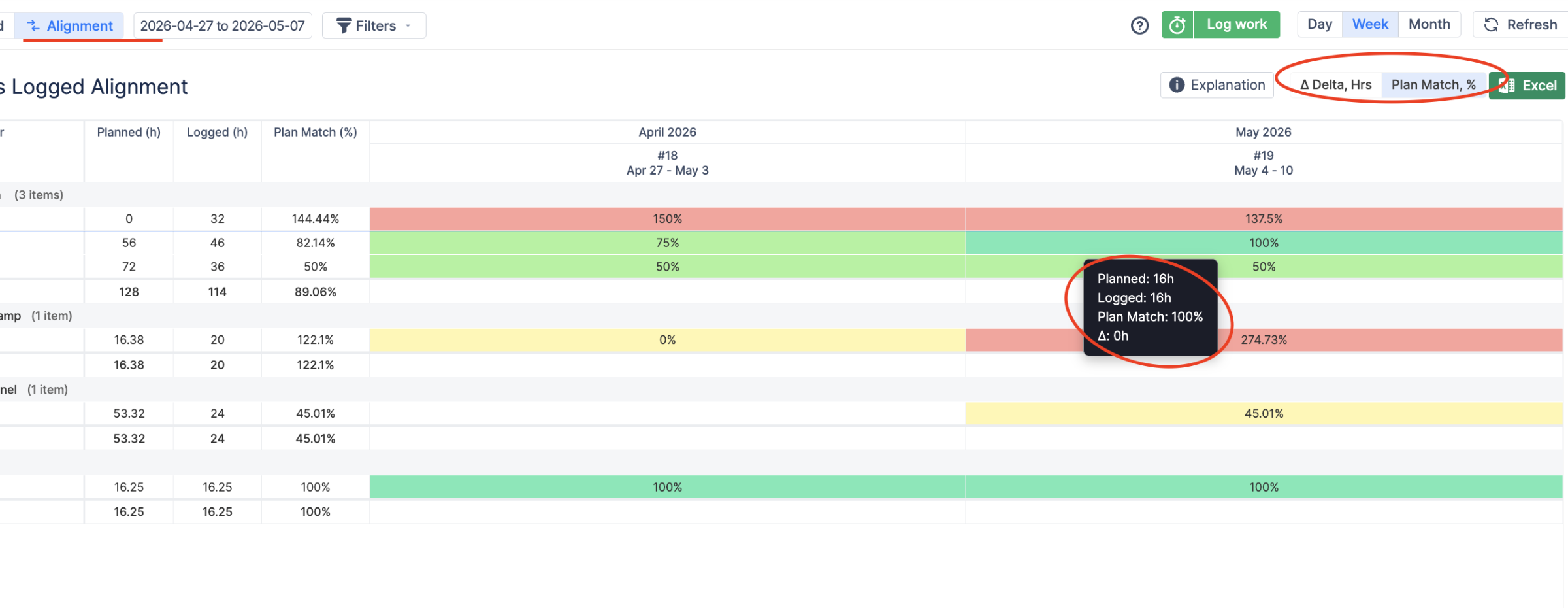
Want to see whether execution matches the plan?
Unlock the Alignment Report in Advanced Edition and compare planned work with actual logged time across users, projects, issues, epics, stories, teams, or custom fields.
Should you have any questions regarding any of the new features
- feel free to contact our Support Team.